share all about mobile phone

Tampilkan postingan dengan label Sony. Tampilkan semua postingan
Selasa, 06 November 2012

Sony Ericsson T715

Style & Handling Summary for Sony Ericsson T715
The sliding design used so successfully in the Walkman range works just as well on the Sony Ericsson T715, although the 2.2-inch screen is really small.
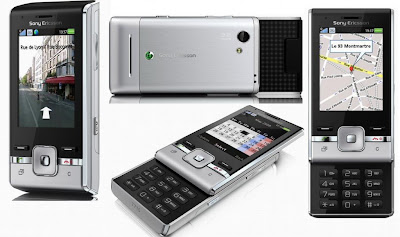
Sony Ericsson T715


User Friendliness Summary for Sony Ericsson T715
It’s easy to get to grips with and very user friendly, and the social networking functions are excellent.

Feature Set Summary for Sony Ericsson T715
Keep in mind that the Sony Ericsson T715 is a budget phone, so not packed with the features of higher-end models, but you can run Twitter and Facebook simultaneously and Instant Messenger and Skype give you extra ways to keep in touch.

Performance Summary for Sony Ericsson T715
The Sony Ericsson T715 performs very well for a phone of its price, especially when it comes to social networking.

Battery Power Summary for Sony Ericsson T715
The battery life is better than average, with up to 240 minutes on 3G

Full Review and Specification for the Sony Ericsson T715

Sony Ericsson is going through a bit of a transition at the moment, as it shelves its popular Cyber-shot and Walkman ranges in favour of the new Entertainment Unlimited range of handsets, including the Aino and the Satio. As a result, the T-series is somewhat overshadowed, which is a shame because the lower-end range is a nice addition to the Sony Ericsson stable. Buy the latest T-series handset, the Sony Ericsson T715, with 3 and you will also get live Twitter feeds direct to your phone.

Style and handling for the Sony Ericsson T715

The Sony Ericsson T715 is a compact slider, similar to the Walkman range of phones. Despite being pleasingly light, the T715’s sliding keyboard is spacious with raised buttons. The display is pretty small, at just 2.2 inches, which makes viewing content difficult. But it’s not a touch-screen so won’t be needing to navigate menus or trying to negotiate an on-screen QWERTY keyboard.

Under the screen sit two hard keys, a D-Pad, a running apps button and a cancel key. But to confuse matters, the right-hand hard key seems to alternate between being a back key and a cancel key, with no apparent pattern. This meant that trying to delete a letter in text sometimes led to closing down the application completely. We suggest using the dedicated cancel key for deleting text just to be safe. The running applications tab is a useful tool; there are plenty of apps in this little handset, some of which can be run simultaneously.

Social networking on the Sony Ericsson T715

Social networking is the Sony Ericsson T715’s forte, with Twitter firmly at the front. Buy the phone through 3 and you get the full-on experience. There are a variety of ways to access Twitter on your phone including setting it as a favourite. To get the most from it, register using the applications menu and you will be able to get live alerts from your friends, dipaly your location and find other Tweeters near you. There’s no GPS connection on the T715, though, so this is done by estimating where you are using triangulation – the same is true for finding your location on Google Maps, which is built in here.

You also get live feeds for Facebook. The platform is nicely split into categories like wall, inbox and friends list, similar to the PC view. You can run Facebook and Twitter at the same time, but because of the small display on the T715, you will only get live feeds from the app you used last.

A nice touch is the ability to send photos taken on the phone’s 3.2-megapixel camera directly to either Twitter or Facebook. The quality of the pictures isn’t good for printing, but is entirely adequate for keeping your online friends up to date with your life.

The verdict on the Sony Ericsson T715

The Sony Ericsson T715 is a good-value social networking phone that it sure to be a hit with younger users. Added to the good social networking functions are Windows Live Messenger and Skype, and despite the small screen size, the handset is a nice, basic model that should keep social networkers happy.
Unknown Sony

Sony Ericsson Naite

Style & Handling Summary for Sony Ericsson Naite
It’s made entirely of recyclable and recycled materials, but the Naite has an old-school charm and an almost too lightweight feel.
Sony Ericsson Naite


User Friendliness Summary for Sony Ericsson Naite
The familiar user interface and bright grid-system menu makes the Sony Ericsson Naite a breeze to use.

Feature Set Summary for Sony Ericsson Naite
While the Sony Ericsson Naite features HSDPA internet speeds, the lack of high-end features keeps it firmly in the middle tier.

Performance Summary for Sony Ericsson Naite
The internet is good and quick, but the camera is not up to scratch.

Battery Power Summary for Sony Ericsson Naite
The battery power on the Naite is astounding – it lasts over 2,000 minutes with using the internet.

Full Review and Specification for the Sony Ericsson Naite

Let’s face it, however good the intentions, mobile phones are not environmentally sound. The parts, the recharging, the shipping all add up to quite a carbon footprint. But mobile phones are here to stay, and the environmentally aware will be pleased to hear that the manufacturers are doing their bit to help.

Sony Ericsson is so dedicated to the cause that it has produced a whole range of eco-friendly phones, called Greenheart. The flagship handset in the range is the Sony Ericsson Naite. The packaging itself is green, with a compact box, an e-manual (no paper, see?) and a carrier case made from environmentally friendly materials. You also get a charger and handsfree kit.

Style and handling for the Sony Ericsson Naite

We knew in advance that the Naite was made of recycled and recyclable materials, so didn’t expect much in terms of looks. We’re happy to admit we were wrong. It has nice, clean retro styling that puts us in mind of the Nokia 6700 Classic. The correlated plastic covering on the back isn’t quite our cup of tea, but it still looks good.

At a featherweight 84g, the Naite is almost too light – it feels insubstantial in the hand and we’re not confident it would survive a fall onto the pavement. The keyboard has been deigned to look metallic, but is feels very plastic under the fingers, and rather flimsy too. But this phone is all about the green credentials, not the design, so criticising the build seems a bit unfair somehow.

The keypad will be familiar to anyone who had a Sony Ericsson phone around 18 months ago. A standard 3x4 keypad sits underneath a shortcut key (from which you can access your favourite apps and any running in the background), call and call end keys, and the cancel key. Above these are two hard keys that work alongside the menu options on the corners of the screen. And in the middle of them all is the D-pad, which is simple and easy to use, and will have even the most inexperienced user whizzing around the menu system in no time.

The 2.2-inch display may be on the small side but boast 16 million colours and is vibrant and bright. It’s particularly vivid on the menu screen, with glowing icons which you can choose to view in a traditional grid format or as a rotating single-icon view. Unfortunately, when it comes to browsing the web, all that vibrancy disappears. Pictures lack brightness and text is thin and insubstantial.

Internet on the Sony Ericsson Naite

However, looks aside, the internet on the Sony Ericsson Naite is a fast experience thanks to the near-broadband HSDPA speeds of up to 3.6Mbps, depending on your network. YouTube was particularly impressive – despite the screen – with videos taking only a few seconds to buffer before playing smoothly.

When you want to view another page, simply start typing on the keypad and your text will automatically be entered into the Google search bar. Zooming isn’t so easy though, and to view the screen in landscape rather than portrait you need to go into the menu and manually select the option, or use the volume keys. It makes us appreciate the accelerometers found on other phones all the more.

There is a Facebook app built in so you can check out status and invite notifications on your home screen, view your friends and update your status. Unfortunately, notifications aren’t pushed to your home screen; instead you have to manually refresh the page.

Eco friendliness on the Sony Ericsson Naite

So, on to the most important facet of the Naite: its environmental credentials. We’ve already mentioned the reduced packaging and recyclable materials used in the hardware, but there are also a couple of applications to help you on your way to a greener lifestyle. A Green Calculator helps you work out your daily CO2 emissions and gives you tips on how to reduce them, while Ecomate is a daily quiz designed to determine how much you know about the environment. A sample question: If five families turned off the tap while washing dishes for a period of 20 years, how many people’s daily water supply would be saved? (the answer is nine million people, by the way).

Camera and music on the Sony Ericsson Naite

The camera on the Sony Ericsson Naite is nothing to shout about. It’s got a two-megapixel lens with no zoom above VGA quality and no flash, and the viewfinder only takes up about two-thirds of the already small screen.

The music player is better, and includes Sony Ericsson’s successful TrackID, which lets you identify tunes and purchase them if you wish from the improved PlayNow service. And while the headset deserves plaudits for being entirely made of recycled materials, a 3.5mm headset port would have been welcome.

The verdict on the Sony Ericsson Naite

It’s good to see a mobile manufacturer attempting to be more eco-friendly, and hope that other mobile phone producers take note and join the party. Granted, it will probably have limited appeal, being short on features, but it’s a good start that hopefully heralds the start of a green mobile revolution.
Unknown Sony

Sony Ericsson Vivaz

Style & Handling Summary for Sony Ericsson Vivaz
The curvy and slender Sony Ericsson Vivaz is available in four colours and has a 3.2-inch touch-screen, making it a very stylish affair. You can check out the Sony Ericsson Vivaz deals here.
Sony Ericsson Vivaz


User Friendliness Summary
The resistive touch-screen is pretty good, but the on-screen keyboard is slow and the user interface frustrating once you get past the top-level icons.

Feature Set Summary
The HD video is the Sony Ericsson Vivaz’s killer application, and the camera also packs a punch. The rest, though, is a disappointment.

Performance Summary
The accelerometer does its own thing regardless of what you want it to do, and the keyboard is slow and none too accurate. But the camera and video work fantastically.

Battery Power Summary
320 minutes’ talktime makes for an average battery life.

Full Review and Specification for the Sony Ericsson Vivaz

We’re all used to impressive camera phones, with snappers beefier than our standalone digital cameras. Now it seems that high-definition video cameras are about to take centre stage. The Vivaz can record 720p video, which is an incredible achievement, but, like the rest of Sony Ericsson’s multimedia range of phones, it doesn’t excel at much else. You can check out the Sony Ericsson Vivaz deals here.

Style and handling on the Sony Ericsson Vivaz
The Sony Ericsson Vivaz is a striking-looking phone, slim and curvy with a metallic sheen that enhances its slender shape. It’s available in black, silver, blue or red and it feels comfortable in the hand. A wide-screen, 3.2-inch, WGVA touch-screen dominates the front fascia.

On the top left-hand corner is a cunningly positioned 3.5mm audio port and on the right-hand side sit dedicated buttons for both camera and video camera. What looks like a giant professional zoom lens on the back of the phone turns out just to be decorative, which is a cheeky move on Sony Ericsson’s part. It’s also unnecessary, as this is one of the most advanced cameras you will find on a phone, and the lens does physically move inside the casing.

User interface on the Sony Ericsson Vivaz
The Sony Ericsson Vivaz is powered by Symbian S60 5th edition, which is already dated, no fun to use and has no central apps store. This is overlaid by the Sony Ericsson interface that we saw on the Aino and Satio, which is far more stylish but just as limited.

The default theme is five screens that you navigated using a toolbar at the top. Four of these are basically large widgets which you can customise for Twitter, favourite contacts and gallery, for example. The last is a list of eight shortcuts. If you’re used to an Android phone, or even a Samsung TouchWiz handset, the customisation options here will seem pretty limited, but you still get more choice than you would on a BlackBerry, for example.

To find the rest of the programs, simply press the central all-programs keys; for apps, you need to go to another folder further in.

Touch-screen on the Sony Ericsson Vivaz
We’ve banged on in the past about the superiority of capacitive touch-screens over resistive, but Sony Ericsson has ignored us, and carries on pushing the latter. However, as resistive touch-screens go, this one is pretty responsive. You need to press harder but the top-level icons are finger friendly and vivid. One level in, though, and it’s all white-on-black text menus.

Annoyingly you need to tap once to select icons and twice for menu selections, which can get confusing. The scrolling method used is also odd: instead of simply dragging your finger over a list to scroll, you have to press and drag on a scrollbar at the side.

There are also flaws with the accelerometer, which sometimes switches formats for no apparent reason and at other times takes forever to change at all. More frustratingly, it is inactive in many functions so when typing in the browser we had no choice but to do it in landscape.

Video and camera on the Sony Ericsson Vivaz
The camera functionality on the Sony Ericsson Vivaz is excellent for shooting both still and video footage. The eight-megapixel camera has an LED flash and auto-focus, and gives you clear, well-coloured results even in low light conditions. Instant shutter release means you can capture action with little to no blur, and even in darker conditions without a flash, night mode produced pictures with true colours, albeit a bit soft around the edges. You get a choice of adjustment settings including white balance, exposure, twilight, portrait and sport.

But it’s the video camera that gives the Vivaz its USP, and this is a good one, with an HD lens, a microphone and video light. Shooting in daylight produces crisp video with bright colours, and picks up both background and foreground light pretty well.

We shot a test video at night in a high street with lit windows, and while there were some light trails when we panned the camera across, it only took a couple of seconds to the light balance to adjust, and it produced a pretty clear picture. Our final test was in a dark room using the video light, and this was the only place we got a dodgy result, with soft, noisy results.

The real highlight of the video camera on the Sony Ericsson Vivaz is the continuous focus feature, which automatically focuses the camera on the central object and refocuses rapidly. When we tested it on a landscape shot with a text-covered box at the front, we had a clear shot in less than a second.

The display doesn’t show up the HD videos to the best of their capability, but it does show web videos nicely. YouTube is well integrated, and you can share videos directly to your account when you are in a Wi-Fi area.

Email and internet on the Sony Ericsson Vivaz
Email on the Sony Ericsson Vivaz is fairly basic, with an unresponsive touch-screen keyboard, a text-only interface and push support for Microsoft Exchange accounts only.

We added our Gmail account and found that we had to send and receive manually to get new mails. And because the client can’t read HTML, and graphics within out emails ended up as a group of symbols.

The keyboard makes typing laborious as you have to press quite hard, and accuracy isn’t great either. On top of that, there’s no auto-suggest, although there is predictive text, which is a little odd for a touch-screen keyboard.

The lack of full HTML is a disappointment, but pages are quite quick to load. You automatically get mobile-optimised sites but if you want to view a full website, it won’t resize automatically so you have to swipe around to see all the content, often hitting links accidently along the way. Pictures render a bit blurry and text is ragged, but if you click through to a photo you will see it clearer and sharper.

The verdict on the Sony Ericsson Vivaz
In terms of media functionality, the Sony Ericsson Vivaz is superb. But there are too many flaws to make it a serious contender: the unintuitive user interface, unresponsive keyboard, non-HTML web browser and mediocre email all count against it. You can check out the Sony Ericsson Vivaz deals here.
Unknown Sony

Sony Ericsson Elm

Style & Handling Summary for Sony Ericsson Elm
The Sony Ericsson Elm looks very basic and slightly cheap, and has a strange arched back. But it’s slim, light and deceptively fully featured.
Sony Ericsson Elm


User Friendliness Summary
You will have no problem finding all those features, with a variety of ways to find and launch them.

Feature Set Summary
The Sony Ericsson Elm pretty much ticks all the features boxes, despite its outwardly tame appearance.

Performance Summary
There are delays when loading heavier applications but the Elm is generally proficient and smooth.

Battery Power Summary
The Sony Ericsson Elm has a pretty good battery life, but drains quickly when you use GPS. You’ll probably need to recharge every day.

Full Review and Specification for the Sony Ericsson Elm

The Sony Ericsson Elm has the outward appearance of a simple candybar handset but is actually so much more. For a start, it has 3G, plus HSDPA at 7.2Mbps, Wi-Fi, GPS, Bluetooth and a five-megapixel camera with LED flash. You can even expand the memory up to 8GB – a pretty impressive feature list for this deceptively simple phone. In fact, the only thing that seems to be missing is a 3.5mm audio jack – you instead need to rely on the supplied headphones.

Green credentials for the Sony Ericsson Elm

The Elm is one of Sony Ericsson’s eco-friendly Greenheart range of phones, which make use of recycled materials and have an electronic manual instead of a paper-wasting book. The latter would be a great idea if you don’t need to find out how to insert your battery and switch the phone on – as you can only find out how to do so by inserting the battery and switching the phone on!

The packaging is also environmentally kind, a minimal as possible and made with materials that don’t contain hazardous chemicals.

Style and handling on the Sony Ericsson Elm

We like the Activity Menu key, which includes a shortcut to the web, other shortcuts and running applications.

There are all sorts of ways to find programs. Pushing up on the dependable D-pad reveals five ‘ghost’ widgets. Choose any one and they’ll form a permanent screen backdrop. The widgets are for calendar, Facebook, Twitter, MySpace and something called Walk Mate Eco, a pedometer that shows how many steps you have taken and how much CO2 you’ve saved. We can’t vouch for the accuracy – after all, how can anyone prove that a certain number of steps equal a certain amount of CO2? But we do like the little shadow figure that walks when you do and stops, with a hand on its hip, when you stop.

The 2.2-inch screen isn’t the biggest or brightest. Don’t get us wrong: it’s perfectly usable, but in a world of OLED and high-resolution screens, this one is somewhat underwhelming.

Feature set on the Sony Ericsson Elm

The screen is one of the lighter features that makes the Elm so reasonably priced, as is the processor, which is pretty slow. You really notice this when you’re trying to launch the Navigation program, for example. It takes a long time to load and while we’re used to waiting for complicated applications to load, this one is surprising because of the Elm’s outward resemblance to a GPRS candybar handset.

There is a range of navigation options including Sony Ericsson’s self-explanatory NearMe, Google Maps and WisePilot. It can take some time to get a location fix, but it remains consistent once it’s found you.

Sony Ericsson prowess with music and photography is on display in the Elm. The five-megapixel camera has a powerful LED flash, the usual SE image-fixing technology, and you can geo-tag your pics thanks to GPS. There is shutter lag in low light situations, though.

As for music, it’s a shame about the lack of a 3.5mm port for your own headphones, but you do get SensMe, which chooses tracks according to mood, and TrackID, which identifies tunes you don’t know from a clip.

The verdict on the Sony Ericsson Elm

The Sony Ericsson Elm is a deceptive creature, looking like a basic candybar and acting like a smartphone, with lots of good features and connectivity options.
Unknown Sony

Sony Ericsson Xperia X10

Style & Handling Summary for Sony Ericsson Xperia X10
The Sony Ericsson Xperia X10 looks like a high-end device, but the plastic body makes it feel less expensive than it is.
Sony Ericsson Xperia X10


User Friendliness Summary
The Xperia X10 is a complicated device but easy to use thanks to simple menus and a home screen key to take you back to the beginning at any point.

Feature Set Summary
Wi-Fi, HSDPA internet speeds, A-GPS, an eight-megapixel camera and access to the Google Android Market for downloads make this a smart phone indeed. Timescape and Mediascape make everything easier too.

Performance Summary
That four-inch screen makes viewing video and the internet a joy, and the camera is the best yet on an Android phone. But it is slow at times.

Battery Power Summary
The Xperia X10 boasts a great battery life of 480 minutes’ talktime and 425 hours’ standby.

Full Review and Specification for the Sony Ericsson Xperia X10

Android phones are really making their mark on the mobile market – may are proving to be worthy contenders to Apple’s iPhone – and Google’s operating system has been adopted by HTC, Samsung, LG and Motorola. Now Sony Ericsson has jumped on board with the Sony EricssonXperia X10.

Style and handling on the Sony Ericsson Xperia X10

The Xperia X10 is long and lean, despite its four-inch screen. It’s slighty bigger than the iPhone 3GS but weighs the same, 135g. This light weight is partly down to the fact that it’s mainly plastic. It looks good, with a glossy front and matte back, but the plastic does become apparent when you hold the phone: it feels pretty flimsy and we wouldn’t want to drop it on to a hard surface. It’s also gets quite grubby quite quickly.

It’s minimalist in design, with just three keys on the front, below the screen: Menu, which you can press from whatever mode you’re in for a list of possible action; Home, which will take you back to your home screen from anywhere; and Back.

The volume/zoom keys sit on the right-hand side of the phone, as well as the dedicated camera key. On top are the power button, a microUSB port and a 3.5mm audio jack – always a bonus for us, especially when positioned at the top of the phone for easy headset connection.

The capacitive touch-screen works well, although we sometimes found it getting away from us – but better to be over-sensitive than not sensitive enough, and like all touch-screens, you will get to know the quirks of yours soon enough.

Android on the Sony Ericsson Xperia X10

Google Android is very present on the Xperia, despite Sony Ericsson’s own interface. The familiar notifications bar at the top of the screen will keep you posted on messages, emails and updates; and the pull-up menu at the foot is also an Android staple.

There are three customisable home screens, and the main home screen has shortcuts to Timescape and Mediascape, which we will talk about in a minute, messaging and calls. If you scroll to the left you see thumbnails of recent and most visited internet sites. The last home screen has a toolbar for data connections such as Wi-Fi and Bluetooth.

Timescape lists all your recent messages, Facebook and Twitter feeds in either a single list you can skim through or for a specific feed for just emails, for example. You can also choose one contact using the infinite key to view every conversation you have had with them over Twitter, email or text.

Mediascape provides access to your music, video and photos in one application. As well as this, pressing the infinite button will show you relevant videos on YouTube, further information on the artist or band you are listening via Google, and the opportunity to buy recommended music from Sony Ericsson’s PlayNow. Selecting a person’s name on a photo will bring up all the tagged photos of that person.

There’s no dedicated search key here like you will find on other Android phones. But there is a Google search bar at the top of the third home screen, and the little microphone icon next to it allows you to speak your search words into the phone. In a quiet place and if you speak clearly, it works really well, and is the sort of little extra that always goes down well with us.

Touch-screen on the Sony Ericsson Xperia X10

The virtual keyboard on the Xperia X10 is one of the best we’ve seen on a Sony Ericsson. Typing in portrait mode requires care because the space bar is so small, but in landscape mode the keys are larger and easier to type on. A neat little touch is that the phone automatically adds word you have typed to its dictionary.

The screen takes a while to auto-rotate which is both frustrating and unexpected, as the X10 has a Qualcomm Snapdragon 1GHz processor which should speed things up considerably but fails to help here. This may be because the X10 runs Android 1.6 while other smartphones are already on version 2.1, so it misses out on features like multi-touch. Sony Ericsson says there will be an update available later this year.

The TFT screen looks lovely when viewing web pages or video (although we should point out that the X10 doesn’t support DivX files). The four-inch screen is the largest yet on any Android handset. You can view web pages in full, and while we didn’t have time to test the theory, we’re sure that watching entire movies would be comfortable too.

Email on the Sony Ericsson Xperia X10

Email also works superbly on the Xperia X10. You can receive push alerts for most webmail accounts with a simple two-step set-up, and Moxia Client allows you to sync your emails, contacts, calendar and tasks with Microsoft Exchange. This is a feature found on Android 2.0 devices, so hats off to Sony Ericsson for including it on the Xperia X10.

Camera on the Sony Ericsson Xperia X10

Cameras have not been a strong point of Android phones up until now, but Sony Ericsson is very good at camera phones, and this is certainly the best we’ve seen yet on an Android device. The eight-megapixel snapper has all manner of settings to achieve the best result and pictures are clean and vivid.

There is also Sony Ericsson’s face recognition technology, which will recognise tagged people in future photos and tag them automatically. It does work, but only if the subject is looking at the camera straight on – and it failed to recognise our subject when she took her glasses off.

The camera took a while to launch, and the touch-screen’s usual responsiveness dropped right off in camera mode. It would also have been nice to see a Xenon flash like other Sony Ericsson camera phones, but this would have made the device much larger, so we can forgive that.

A-GPS on the Sony Ericsson Xperia X10

The size of the screen on the X10 means it could be a viable alternative to a standalone sat nav unit. Google Maps is still an impressive application, with traffic info, points of interest and all sorts of map views. We got an almost instant fix on our position, and it held that fix well.

As for software, you get a trial version of Wisepilot, but there are plenty more available at the Android Market.

Verdict on the Sony Ericsson Xperia X10

Sony Ericsson’s first Android phone can be counted as a success. The size may put people off – there’s a mini version on the way – but the four-inch screen is lovely and makes internet and video content a joy to watch.

Timescape and Mediascape work well for integrating your social networks and media respectively, and the camera is impressive compared to other Android cameras. But there’s not quite enough to put it on a level with the HTC Legend or Desire.
Unknown Sony

Sony Ericsson W205

Style & Handling Summary for Sony Ericsson W205
The small screen and plastic finish make for a lightweight handset, but for £25 you can’t expect much more.
Sony Ericsson W205


User Friendliness Summary
The keypad is tactile and comfortable, and the familiar user interface is intuitive.

Feature Set Summary
Pretty basic, as you would expect. No bundled USB and a very low memory mean you have to pay out for both file transfer and storage space if you want to use it as a music player. There’s a 1.3-megapixel camera for quick daylight snaps, and a couple of Java games.

Performance Summary
The internet is too slow to use, and the camera takes blurry, pixelated shots. Sound is shallow, with low bass.

Battery Power Summary
Thanks to the lack of 3G and power-hungry features, you get up to a massive 540 minutes of talktime.

Full Review and Specification for the Sony Ericsson W205

The Sony Ericsson W205’s main selling point is the fact that you can get it for £25 on prepay. The W in the name makes it nominally a Walkman phone, but really it’s just a basic, cheap, easy-to-use handset.

Style and handling on the Sony Ericsson W205

The matte plastic finish gives the phone a lightweight feel – rather too much actually, as it feels insubstantial in the hand. It does have a smooth slider mechanism, though. The screen is just 1.8 inches with a wide black border, which could have been used for extra screen space. Below the screen are the media control keys – play/pause, back/forward and a shortcut to the music player. The right key takes you to your contacts and the left to the 1.3-megapixel camera.

The silver keypad has slightly curved keys which are pretty comfortable to type on, albeit a little heavy. Texting is a quick enough process, althoughT9 predictive text is a little random. It won’t correct contractions like “how’s”, for example, but will contract “it’s”. This means you will have to type them manually with the punctuation the first time you use them.

The contacts book has space for a thousand contacts, and you can also keep up to four private phonebook for easy categorisation of different sets of friends, family or business contacts, for example. Call quality is very good at both ends.

Music on the Sony Ericsson W205

Well this is a Walkman phone but don’t go expecting a fully-featured music experience. The first stumbling block is the internal memory: just 5MB. This is barely enough to hold contacts and messages, let alone any tunes. There is a slot for an M2 MemoryStick (Sony Ericsson’s proprietary memory card), but you can only get up to 2GB on one card – approximately 500 songs. It’s not a huge problem, as music lovers will have higher spec players anyway; this is a budget handset for people who like to carry a few tunes with them.

A bigger issue is that there is no USB cable bundled in. Although you can transfer files via USB, using Sony’s usual chunky E-port, you will have to buy your own cable. The other option is to transfer files by connecting the handset to your PC via Bluetooth. It takes a while.

Playing music is more straightforward. You get direct access to the music player by pressing up on the D-pad, and tracks are displayed by artist, track and album as well as time elapsed. You get the usual settings of shuffle, repeat mode, playlists and you can filter your songs by track name, artist and album.

There’s no 3.5mm audio jack so you’re stuck with the bundled headphones, which are very basic. Bass is low and there’s a lack of fullness.

You do get TrackID, but only for use on the handset’s radio, and we like that you can use your own MP3s as ringtones.

Camera, web and games on the Sony Ericsson W205

As you would expect from a 1.3-megapixel camera, photos are pixelated and noisy even in good light, and there is no autofocus. No flash either, so no night shots. You can share your pictures using MMS or Bluetooth.

Internet speeds are a very slow GPRS, and the embedded browser isn’t much quicker. You certainly won’t be doing any involved browsing on the W205, that’s for sure.

Finally, you get two standard Java games, including Bubble Town, and you have the option to download more from Sony Ericsson – although that internet connection is likely to put you off.

The verdict on the Sony Ericsson W205

It may be called a Walkman phone, but the Sony Ericsson W205 barely fits the bill, especially as you don’t even get a USB cable for easy file transfer and the internal memory is tiny. But as a basic phone for a very good price, it does the job nicely.
Unknown Sony

Sony Ericsson Jalou

Style & Handling Summary for Sony Ericsson Jalou
The Sony Ericsson Jalou is a tiny clamshell with bevelled edges and a shiny, jewel-like finish, and a tactile, small keyboard with diamond-shaped keys. It even doubles up as a mirror.
Sony Ericsson Jalou


User Friendliness Summary for Sony Ericsson Jalou
Sony Ericsson’s grid-style menu is very easy to navigate and setting up IM is a really complicated process. And it’s really, really hard to open with one hand.

Feature Set Summary for Sony Ericsson Jalou
The tiny fashion phone boasts a good range of features including a fully-feature Facebook app, and support for HSDPA internet.

Performance Summary for Sony Ericsson Jalou
Movies are surprisingly nice looking on the small screen, but the tinny bundled headphones make sound less impressive. Facebook is just great, though.

Battery Power Summary for Sony Ericsson Jalou
Battery life is average, considering that there are no Wi-Fi or GPS to swallow the power.


Full Review and Specification for the Sony Ericsson Jalou

It’s never happened before, but we have a real problem with the Sony Ericsson Jalou. Sure, this tiny, good-looking clamshell is a good media device with a superb Facebook app – but it’s also outrageously difficult to open up.

Clamshells are great because they feel like mobile phones used to. You can flip it open when it rings and snap it shut at the end of the call with a businesslike click. All very Star Trek and satisfying. Unfortunately, it doesn’t work so well when you have to struggle to open the thing – it’s too glossy to get a grip on, too closely fitting to open one-handed and the hinge mechanism is heavy and hard to manoeuvre.

Appearance for the Sony Ericsson Jalou

The Sony Ericsson Jalou is a good-looking handset that comes in a choice of jewel-like colours with nicely bevelled edges. Our model was deep amethyst and it was lovely. If you want to go all designer, there’s even a Dolce & Gabbana model available. The tiny handset is about half the size of your palm, adding to its jewel-like quality.

Once you managed to get it open, you’ll find a nice matt-black plastic keyboard with flat, silver, diamond-shaped keys. The hexagonal D-pad has four customisable shortcuts, and the menu is a grid of stylish, vibrant icons.

Messaging on the Sony Ericsson Jalou

Sony Ericsson’s updated messaging menu combines your email, texts, Facebook messages and Instant Messenger, which is a handy feature. The IM program is quite difficult to set up, though – you are required to fill in details like ‘Server’ and ‘Connection Type’ without any form of guidance, which seems a bit much to ask of the target audience. That audience is hardly tech-heads. If the design and specs weren’t enough to convince you of that, the fact that the screen turns into a mirror might.

Facebook on the Sony Ericsson Jalou

The Jalou has a Sony Ericsson-optimised full Facebook app that makes for an excellent experience. Notifications are pushed to your home screen with desktop-like efficiency, and you can check your profiles as well as those of your friends, comment on and Like posts, hit links, wall-post or message people and even directly text or call friends who include their contact details.

Leave the app running in the background – which you need to do to receive push notifications – and a Facebook widget appears on your home screen. Use the up and down keys to scroll between status updates, an update feed and your message inbox. Click on either one to be taken back into the app. You can take and upload photos directly from Facebook. If you’re not in Facebook, taking a picture on the Jalou’s camera will offer you the option to upload, as well as share it on MySpace, Picasa or Blogger.

Camera and media on the Sony Ericsson Jalou

The camera has a three-megapixel lens, which is low spec but enough for internet publishing, and no flash or autofocus. But it does have night mode, other modes including sequenced shots and panorama, and a selection of effects and filters. You also have Photo Fix, which allows you to sort out any problems with light or sharpness on your snaps.

You also get a good amount of media features including a music player, video player, YouTube, radio and access to the PlayNow Arena, Sony Ericsson’s download store. From here you can download games, videos, movies and music, although they can be pricey.

Another bonus is high-speed HSDPA internet access, which is particularly handy if you’re planning on downloading a lot of YouTube content, although no Wi-Fi. Unbelievably, movies don’t look too bad on the teeny screen, but the bundled headphones are tinny and there’s no 3.5mm headphone port.

One problem was that the phone did tend to lag, especially when loading or exiting apps, thanks to its small processor. There was often a freeze of a few seconds after exiting too.

Verdict on the Sony Ericsson Jalou

Fashion phones often suffer in the specs department, but the teeny, jewel-like Jalou manages to combine both fairly successfully. The Facebook app is excellent, giving you push notifications to your home screen – it’s actually superior to some smartphones in that respect. HSDPA internet means you can stream YouTube and download apps from the PlayNow Arena, and the small screen doesn’t do a bad job with movies. Now, if we can just get it open..

Unknown Sony

Sony Ericsson Vivaz Pro

Style & Handling Summary for Sony Ericsson Vivaz Pro
The Pro has a sleek curved body with a 3.2-inch resistive touch-screen and a spacious slide-out keyboard. It’s a shame that the outdated Symbian OS holds it back.
Sony Ericsson Vivaz Pro


User Friendliness Summary for Sony Ericsson Vivaz Pro
You can launch the camera and video from any app thanks to the dedicated buttons, but the user interface is clunky and feels out of date.

Feature Set Summary for Sony Ericsson Vivaz Pro
The big-ticket features here are the HD video and five-megapixel camera, but you also get HSDPA internet speeds, Wi-Fi and A-GPS. There’s no push-email support.

Performance Summary for Sony Ericsson Vivaz Pro
The five-megapixel camera produces really daylight shots, although lowlight pictures can be blurry. The touch-screen is a tad slow, but made up for by the comfortable QWERTY keyboard. Email is anaemic with no push function.

Battery Power Summary for Sony Ericsson Vivaz Pro
The 310-minute talktime is better than similar phones on the market.

Full Review and Specification for the Sony Ericsson Vivaz

The Vivaz Pro has some lovely features, including an HD video camera, a QWERTY keyboard and a pretty quick processor too. But the Symbian operating system holds it back and takes out the fun – the intuitive enjoyment you should get from your phone.

Style and handling on the Sony Ericsson Vivaz Pro

The Vivaz Pro is just 15mm thick with a rounded shape that feels good in the hand. Like its predecessor, the Vivaz HD, the Pro is a media phone, with a high-spec camera and video. The five-megapixel lens is smaller than the Vivaz HD’s eight megapixels, but there is the addition of a four-line slide-out QWERTY keyboard. On the right-hand side of the handset are dedicated camera and video buttons, and there are also the twin benefits of a 3.5mm audio port and a miniUSB charger port – a welcome departure from the proprietary Sony Ericsson charger port.

The 3.2-inch resistive touch-screen needs hard treatment to operate, but the slide-out keyboard means you’re not reliant on on-screen typing, so it’s less of an issue than is was on the Vivaz HD.

The aged Symbian OS has been overlaid by Sony Ericsson’s own user interface, but it still feels creaky. The five home screens are basically oversized shortcuts to applications such as the browser or gallery, and the Adobe Flash application turned out just to be a Flash-animated background that changes orientation when you turn the phone around. But you can link the screens to your favourite contacts and web links, and re-order the position of the programs in the All Programs menu.

Lock the handset, and a rather ugly black box appears that links to the dialler, messages, gallery and search function.

Camera on the Sony Ericsson Vivaz Pro

The Pro’s five-megapixel camera gets better results than many other phones with similar specs, with almost instantaneous shutter speed and just one second to wait between taking your next picture. The shutter button is close to the keyboard, which made the whole experience feel unsteady and sometimes led to unintentional typing.

Daylight shots are so clear as to be on a par with the Vivaz HD’s eight-megapixel camera, although pictures taken in low light come out slightly faded and fuzzy. Bright light led to overexposure, but shots taken in the shade were sharp and clean.

The video camera shoots video at a high-definition 720 frames per second, and offers ‘continuous focus’, which means you can pan the camera around and it will automatically refocus as necessary. Playback is smooth, and a TV-out port means you can watch your footage on the big screen. We also like the front-facing camera for making video calls.

You can share your photos using email or text, or upload them directly to Facebook, Twitter or Blogger. The Facebook application itself is well implemented, and preloaded apps for YouTube, WorldMate travel organiser and NeoReader, the handy barcode scanning app. These make up for Symbian’s lack of a central apps downloads portal.

Internet and email on the Sony Ericsson Vivaz Pro

Go online and you will automatically be taken to mobile-optimised websites. It can handle non-optimised sites but with no autofit function, you are left having to drag the page around to be able to read it all. Pages load quickly – even non-optimised sites are up in less than 10 seconds thanks to HSDPA and Wi-Fi connectivity – and pictures and graphics look clear, although the text is a little ragged at the edges. There’s no cut and paste function, sadly, but you can view multiple pages in a carousel, and subscribe to RSS feeds from the browser.

Email is pretty basic. There is no push notification and the lack of HTML support means you won’t be able to view in-message graphics. You have to refresh your inbox manually, and new messages come up as simple white text on a black background.

We added our Gmail account and found that we didn’t get our mails displayed as conversations as we do on the desktop and many other handsets, although we did get access to custom folders.

The slide-out QWERTY keyboard is great, with matte keys that are well spaced out and take little pressure to operate. There are shift keys for capitalising and an alt key for numbers and common symbols. It’s nice to see a dedicated question mark key but contracted words aren’t automatically given an apostrophe and you don’t get your ‘I’s automatically capitalised either. Copy and paste works as it does on a PC: just press the shift key and a direction key to select text. You can hold down a finger and drag too, but this takes some practice.

The verdict on the Sony Ericsson Vivaz Pro

The Pro’s QWERTY keyboard makes this phone far easier going than the Vivaz HD, and the high-definition video is another good addition. The camera is lower spec but still produces decent results. Email is mediocre at best. The Pro is basically a feature phone with internet features – good enough in itself but unlikely to cut it against similarly priced smartphones.
Unknown Sony